Release Notes: A26.1.a
Planned Deployment Date: 16 January 2026
Overview
This release introduces a series of updates to the Multi-Lots Control Panel, focused on improving usability, reducing friction during live events, and ensuring a more consistent experience when managing multiple lots.
New Features
- Responsive Multi-Lot Control Panel:
- The Control Panel is now fully responsive, providing an optimised experience across desktops and tablets.
- The Lot Intro and Lot Bid Page buttons now dynamically reposition based on the number of lots:
- They appear directly beneath the last lot when there are 13 or fewer lots.
- If more than 13 lots are present, the buttons move to the bottom of the lots section.
- Background music controls have been relocated to the top-right, positioned in front of the Intro button, and now display updated icons.
- The Outro and Attendance buttons are now aligned on a single horizontal line.
- Sold Popup Warning:
- A new warning message appears in the Sold popup modal when there are pending online bids.
- A new warning message appears in the Sold popup modal when there are pending online bids.
- Merged Tabs:
- The Online Activity tab has been merged into the Controls tab.
- All related actions and controls are now managed from a single Controls tab.
- Updated Navigation Labels:
- Go to Property Intro has been renamed to Lot [Lot number] Intro.
- Go to Property Bid Page has been renamed to Lot [Lot number] Bid Page.
- Conditional Visibility:
- Scribers will only see Online Activity controls within the Controls tab when Online Bidding is enabled.
- If Online Bidding is disabled, these controls will not be displayed.
- Updated Terminology:
- The term Property has been replaced with Lot in the following areas:
- The reverse bid modal for lots currently on the market.
- The People In Attendance modal.
- Popups triggered when bidders are added, updated, or removed.
- The Outro Loop.
- The term Property has been replaced with Lot in the following areas:
- Bidder Number Repositioning:
- Bidder numbers are now displayed at the bottom of the Controls tab in a dedicated section.
- Online bids appear above the bidder numbers section.
Benefits
- A cleaner and more intuitive Control Panel layout.
- Reduced need to switch between tabs during live auctions.
- Context-aware controls that adapt based on Online Bidding status.
- Improved visibility of pending online bids before confirming a sale.
- Consistent use of the term Lot across all multi-lot workflows.
Important Notes
- Users should take time to familiarise themselves with the updated Controls tab layout.
- Any functionality previously accessed via the Online Activity tab is now located within Controls.
- Pay close attention to the new Sold popup warning to avoid missing pending online bids.
- The term Lot will now be used consistently throughout the Multi-Lots Control Panel.
New Control Panel Screenshot
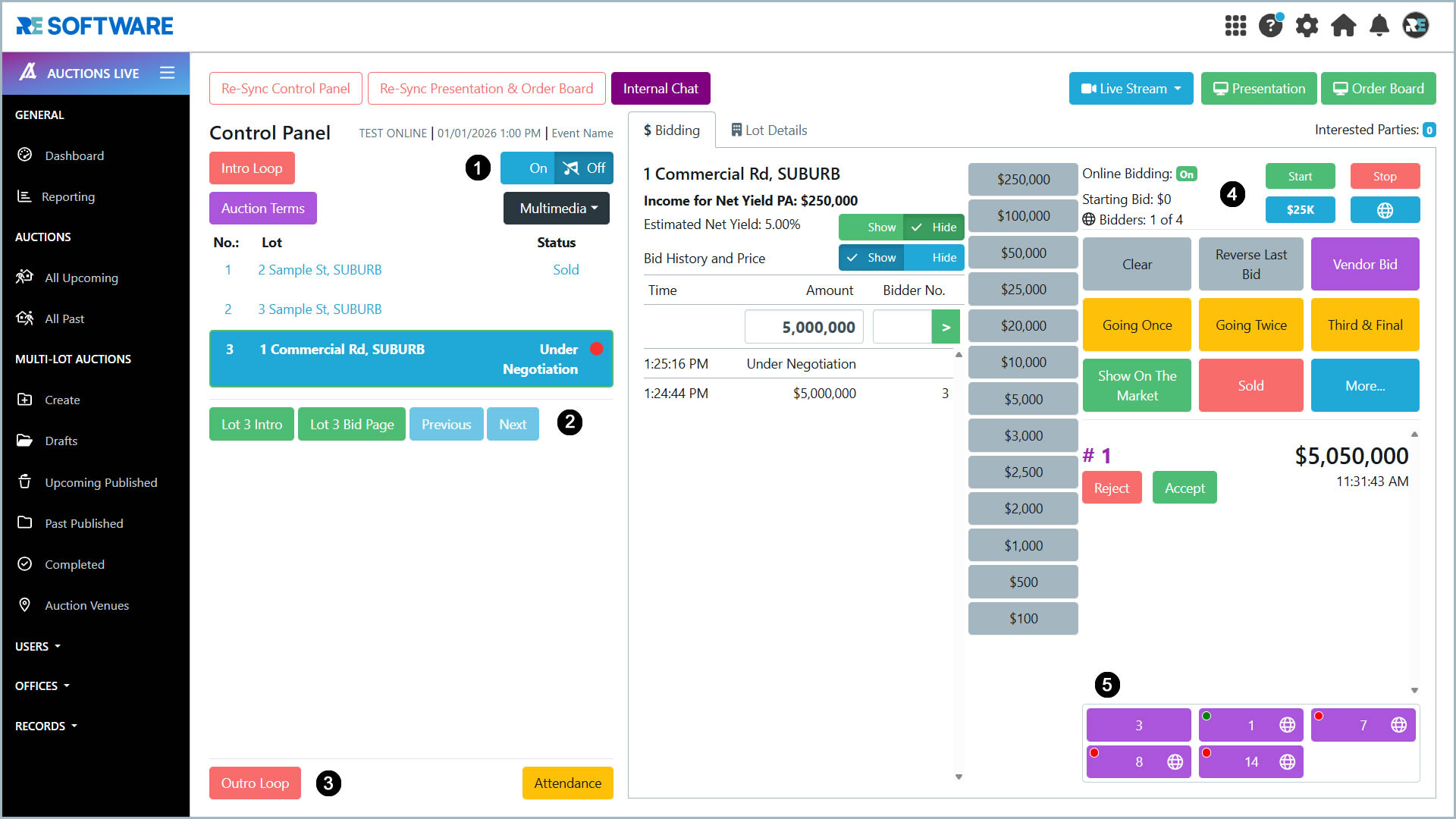
- 1. Background Music Controls
- Background music controls have been relocated to the top-right of the Control Panel for easier access.
- 2. Updated Navigation Labels
- Go to Property Intro has been renamed to Lot [Lot number] Intro.
- Go to Property Bid Page has been renamed to Lot [Lot number] Bid Page.
- 3. Button Alignment
- The Outro and Attendance buttons are now aligned on a single horizontal line.
- 4. Merged Tabs
- The Online Activity tab has been merged into the Controls tab.
- Scribes will only see Online Activity controls within the Controls tab when Online Bidding is enabled.
- 5. Bidder Numbers
- Bidder numbers are now displayed at the bottom-right of the Controls Panel in a dedicated section.
✅Deployed⛔Postponed🛠️Under Development⌛Under ReviewIf you would like more information, wish to arrange a demonstration, or schedule a discussion before or after deployment, don't hesitate to get in touch with your RE Software Account Representative and provide the reference code.
Posted 6th January, 2026