Upgrade Your Live Stream with Dolby OptiView
A New Era of Live Auction Performance
Auctions Live is now rolling out its latest streaming upgrade, powered by Dolby OptiView from Dolby Laboratories. It marks a significant step forward in how auctions are delivered, experienced, and ultimately, how they convert.
A Name You Already Trust
You probably already know the Dolby name.
From Dolby Vision to Dolby Digital, it has long been associated with premium viewing experiences across film, television, and live content.
Now, that same level of thinking is being applied to auction day.
This is not about adding features. It is about lifting the standard of how auctions are seen and felt by buyers.
Built for Speed. Designed for Impact.
This is not just a quality upgrade. It is a performance upgrade.
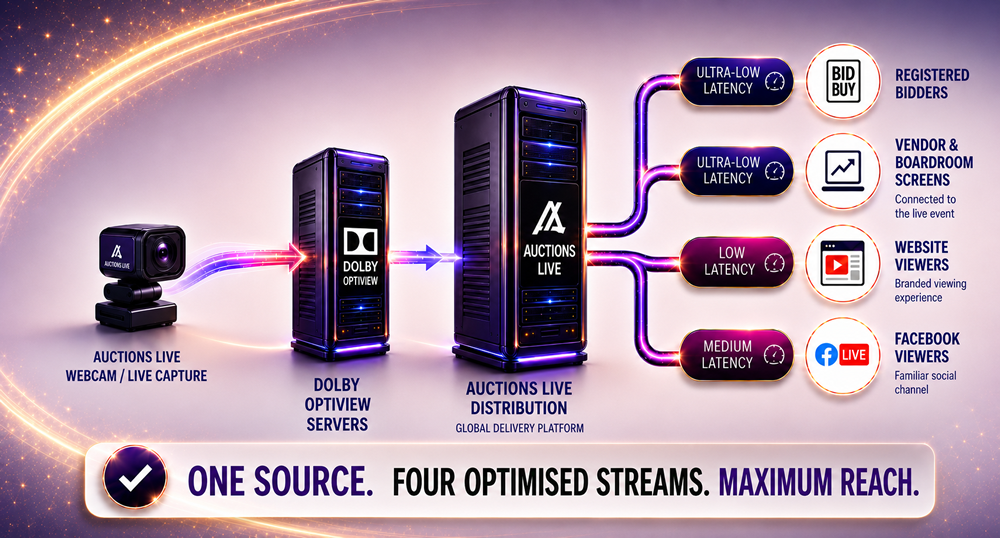
Your stream is now intelligently split and delivered based on who is watching, ensuring each audience receives the experience best suited to them.
Registered Online & Telephone Bidders
• Ultra low latency stream, typically under 0.5 seconds
• Real time bidding without hesitation
Vendor / Board Room
• Ultra low latency stream, typically under 0.5 seconds
Website Viewers via YouTube Live
• Approximately 1.5 to 2 seconds latency
• Smooth, reliable viewing with automatic recording
Facebook Live
• Approximately 10 seconds latency
• Extended reach across social audiences
One broadcast. Multiple optimised outputs. All managed through the Broadcaster App.
YouTube Live Setup
To take full advantage of the new streaming structure, a YouTube Live connection is required.
This is not instant. YouTube Live activation can take up to 24 hours after setup.
Set this up now or you will delay your upgrade.
We strongly recommend completing this step in advance so your office is ready to go live without interruption.
Follow the step by step guides below:
• Setting Up and Enabling YouTube Live
• Connect Your YouTube Live Account to Auctions Live
Getting this done early ensures your upgrade can be activated without delay.
One Stream. Multiple Audiences. Zero Compromise.
Instead of forcing a single stream across every viewer, your auction is now processed through Dolby’s infrastructure and distributed intelligently.
This means:
• A high priority stream for bidders where timing matters most
• A scalable stream for public viewers
• A social stream designed for reach and visibility
The result is a cleaner, faster, and more controlled auction environment.
It sets a new benchmark for what a live streamed auction should feel like.
An Immersive, Interactive Auction Experience
This upgrade is designed to create a more immersive and interactive live auction experience.
It is no longer just about watching an auction unfold. Buyers are part of it, reacting in real time, engaging with confidence, and making decisions without delay.
What You Need to Get Started
Accessing the upgrade is straightforward. Your office will need:
• The latest version of the Broadcaster App
• A dedicated YouTube channel connected to Auctions Live
Once enabled, your stream is captured once and distributed across multiple endpoints automatically.
Using OBS?
OBS can still be used as part of your setup.
Some additional configuration is required to align with the new streaming structure, so it is recommended to speak with your Auctions Live representative to ensure everything is set up correctly.
If you’re planning to use OBS, we strongly recommend following our step-by-step setup guide to avoid any connection or performance issues when going live: Set up OBS Studio for Auction Live Stream via Dolby
And We Are Not Done Yet
This is just the beginning.
Further live streaming enhancements are already in development, with new capabilities set to roll out soon. Each release is focused on pushing performance, reliability, and engagement even further.
We are building the future of live auctions.
How to Upgrade
Upgrading is simple.
To activate Dolby OptiView streaming, contact your RE Software account representative.
Your upgrade will be enabled once:
• The latest Broadcaster App is in use
• Your YouTube channel is connected
• Any required setup, including OBS if applicable, has been confirmed
Our team will guide you through the process and ensure everything is ready before you go live.
Make the Move
This is more than an upgrade.
It is a shift in how auctions are experienced.
Once you are on it, you will not look back.
Posted 18th April, 2026