How to Capture Bidders at Auction
A simple office checklist for registering bidders, assigning bidder numbers and ensuring bidding activity is connected.
Capturing Bidders at Auction
A simple office checklist for registering bidders, assigning bidder numbers and ensuring bidding activity is connected to the correct buyer during the auction.
Auctions Live provides Electronic Bidder Registration tools that allow your office to capture bidder information before or during an auction.
The process is straightforward: enable bidder registration on the property, encourage buyers to register, approve them and issue a bidder number, then ensure the correct bidder number is selected when their bids are recorded.
Enable Electronic Bidder Registration
First, make sure bidder registration is enabled on the property before encouraging buyers to register.
-
Log into the PC Console and navigate to your Auctions Live Dashboard.
-
From the left-hand menu, select All Upcoming.
-
Locate the property and click the Edit icon on the right-hand side of the listing to open the property Edit page.
-
Scroll below the property address and locate the available Bidding Methods.
Electronic Bidder Registration can also be enabled by default for properties imported from your CRM. To configure this, review the Property Sync Settings located within the Integration tab.
If you operate from a Head Office or Corporate account that is linked to multiple office accounts, this setting will need to be updated individually within each office account.
If you do not currently have access to switch between linked office accounts, please contact your Auctions Live Account Representative and request that Switch To Access be enabled on your user profile.
Get Buyers Registered
Buyers can register themselves before the auction, or your team can manually add them.
Scenario A. Buyer Self-Registration
Buyers can register by selecting the Bidder Registration link on the office website, using a registration link sent directly by agency staff, or scanning the Bidder Registration QR code. Once the registration has been submitted, agency staff can review and approve the bidder before assigning a Bidder Number. Only approved bidders will appear in the Auction Control Panel.
Scenario B. Manually Register a Bidder
If a buyer has not pre-registered before the auction, your staff can manually register them directly through Auctions Live.
Use Bidder Numbers During the Auction
This is the important part of the process when you want the auction record to identify which registered buyers were actively bidding.
Approved Bidders Appear on the Control Panel
If bidders have registered and been approved prior to the auction, they will be available from the Control Panel and can be selected during the auction.
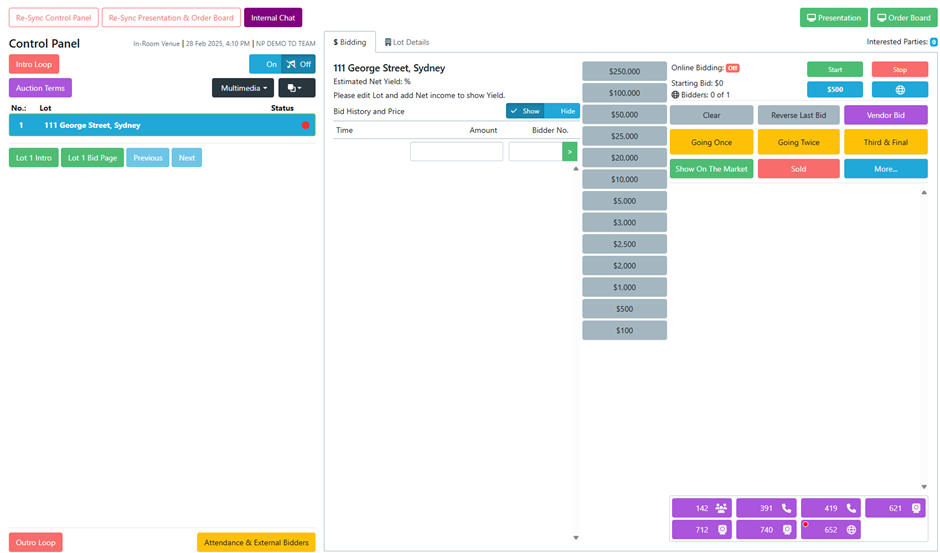
Allocate the Bidder Number When Scribing
When recording a bid, ensure the correct Bidder Number is selected before submitting the bid.
Work with your Auctioneer so bidder numbers are communicated aloud during the auction where appropriate, making it easier for the scribe to accurately allocate each bid.
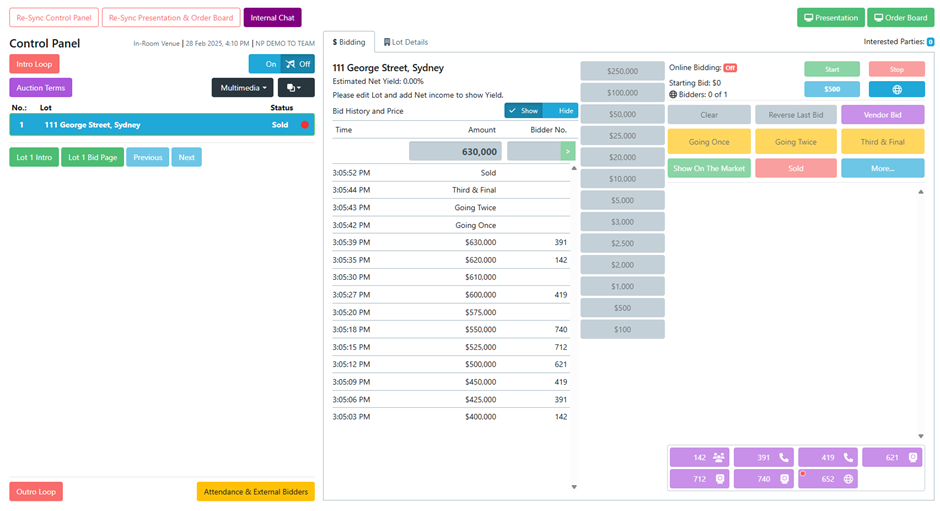
Office Checklist
Use this as the simple process to follow for each auction campaign.
Before and During the Auction
Tick each item as your team completes it.
Need More Help?
Explore the bidder registration resources or book a training session with the Auctions Live team.
Every Registered Bidder Is a Buyer Opportunity
Learn more about why capturing bidder information before an auction can be valuable for your office.
Read MoreBidder Registration Training
Schedule a training session with the Auctions Live team to go through bidder registration and system setup with your office.
Schedule TrainingPosted 26th August, 2026